SSL (Secure Socket Layer) Team:
- Emily Cope
- Bre Daley
- Lucas Everett
- Krishna Ghamandi
- Toni Ward
PWEB SSL Renewal Process
Domain Validations must be completed prior to the order of the certificate.
- The SSL Team will reach out a month prior to expiration if the client is needing to complete anything for the domain validations for their upcoming certificate renewal.
- After the domain validation is completed the SSL Team will communicate with the PWEB OPS Team to get the certificate renewal order started.
- You can keep track of the progress here.
PWEB New SSL Setup/Order
These are rare, but if an FI changes to a Multi-Domain SSL because of a merger/acquisition/add domain, the SSL will need to be ordered and installed with OPS.
- Reach out to Emily Gershbein to initiate a new data sheet for the SSL.
- We are not selling new EV SSL Certs. All new certs are Standard or Standard + SAN
- Initial Fee is $500 and $25/domain per month
- After billing approval and new data sheet is signed, fill out the form here: http://webrequestforms.websol.dev.jha/Home/SSLSetupRequest
- The information that is populated after you hit submit is what you put in the case note to OPS
- Email the SSL Team the domain(s) that are going to be on the new certificate
- They will initiate the domain validations for this certificate and reach out if the client needs to complete anything.
- Once the domains are validated, they will email you back and you can continue with the request for OPS.
- Create Case
- See section 1 in the CWA jSource Guide doc on how to create a case
- Add folder number (find in Slate) and due date to Problem Summary field
- Add note to OPS
- Paste in the information from the form you filled out above
- Note Type should be Comment
- Add CWR Requested Completed Date
- Select the date you put as the Due Date
- Add yourself as an Interested Party
- Hit Save at the TOP of the page
- Add Transfer note to OPS
- Note type should be Transfer
- Change status to Open-Transfer on the Case tab
- Change Provider Group to HPS – SO Web Solutions
- Leave case Unassigned
- Hit Save at the TOP of the page
Banno SSL Renewal Process
The Banno SSL Spreadsheet is updated here in SharePoint by Emily & Toni at least 1 month in advance.
Review the spreadsheet at least 1 month in advance and determine if you need to reach out to your clients to discuss the pricing. (Most contracts have the billing for SSLs built in, however, there are still several each month that will get billed directly for the renewal and we need to have their approval prior to putting in the case.
The spreadsheet will show who you will send the SSL Renewal case to. The case details will be the same, no matter who you are sending to.
- Create CWR Case like normal
- See section 1 in the CWA jSource Guide doc on how to create a case
- Add domain and expiration date to Problem Summary field
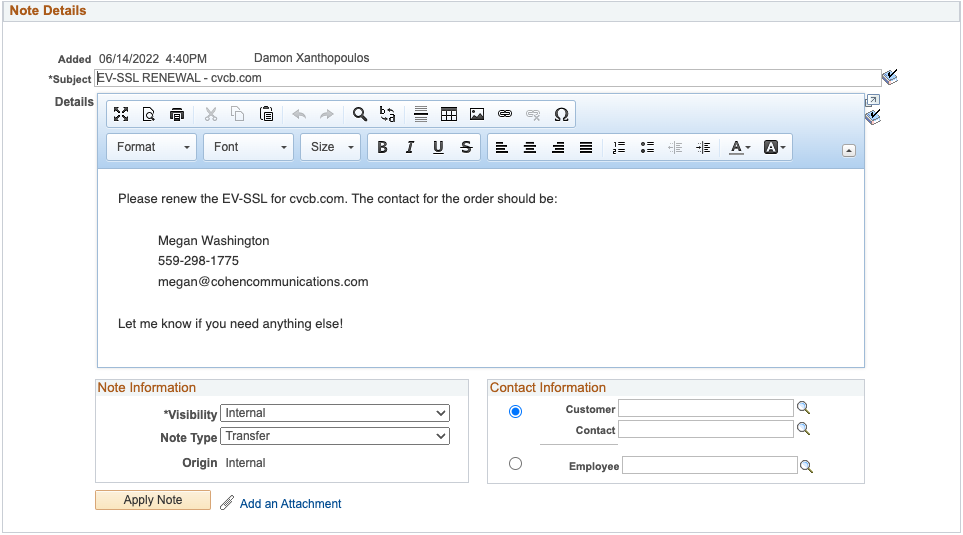
- Add note to SSL Team member with certificate information
- Include domain(s) on the certificate
- Include contact that should be listed on the certificate renewal
- Include how long the certificate should be renewed for
- Include date of expiration
- Example:
- Add CWR due date (at least 1 business day prior to expiration)
- Hit Save at the TOP of the page
- Make sure you are listed as an interested party on the case
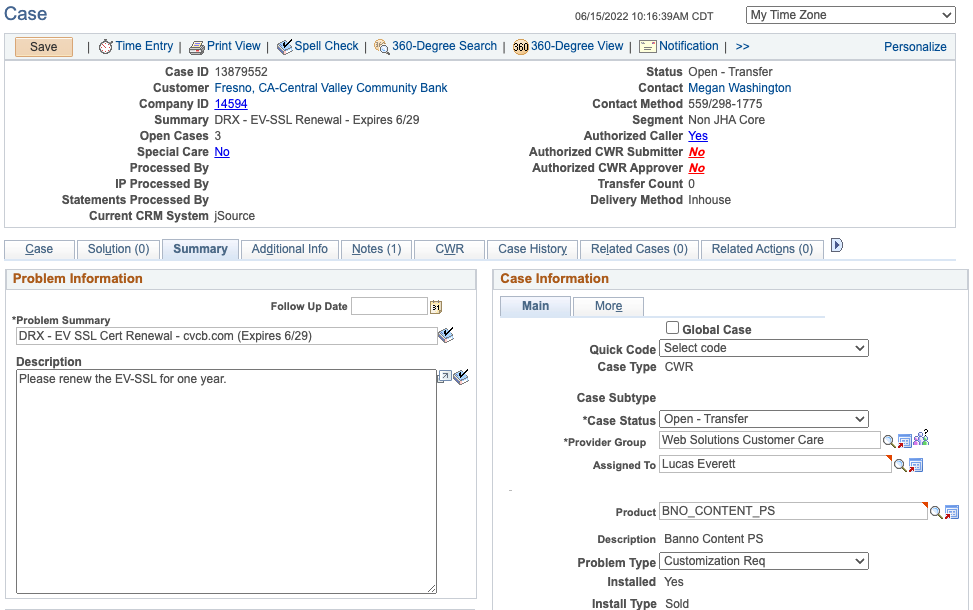
- Add Transfer note to SSL Team member
- Note type should be Transfer
- Change status to Open-Transfer on the Case tab
- Assign to SSL Team member
- Example:
- Hit Save at the TOP of the page
Banno New SSL Setup/Order
Typically, new SSL requests for Banno are to upgrade to a multi-domain SSL Certificate.
- Reach out to Emily Gershbein to initiate a new data sheet for the SSL.
- We are not selling new EV SSL Certs. All new certs are Standard or Standard + SAN
- Initial Fee is $500 and $25/domain per month
After billing is approved and data sheet is signed and sent back to Emily, you can put in a case to SSL Team.
a. If the current domain(s) for the website are fully in Cloudflare you will need to add the information in the #org-launch-control team Slack channel.
- If this new domain is going to be setup in our Cloudflare DNS account, create a Green Card.
- If this new domain has DNS setup with a 3rd party, create a Blue Card.
- Fill out the information added through the card template and transfer the card to the ‘Doing – With OPS’ column. Add Emily, Krishna or Toni to the card.
b. If the current domain(s) for the website are not fully in Cloudflare please follow these steps:
- Create CWR Case like normal
- See section 1 in the CWA jSource Guide doc on how to create a case
- Add domain and due date to Problem Summary field
- Add note to SSL Team with certificate information
- Include domain(s) on the certificate
- Include contact that should be listed on the certificate
- Include due date
- Add CWR due date (at least 1 business day prior to due date)
- Hit Save at the TOP of the page
- Make sure you are listed as an interested party on the case
- Add Transfer note to SSL Team
- Note type should be Transfer
- Change status to Open-Transfer on the Case tab
- Change provider group to Web Solutions Customer Care
- Leave unassigned
- Hit Save at the TOP of the page
- Share case details in #team-content-ssl Slack channel, and a SSL Team member will proceed with ordering the new cert.
- Send case to Banno Tech OPS in jSource for new domain setup and redirects (if needed)