Issue
Form Submission triggers listen for a form submit event, but Form Builder is using event.preventDefault(), which prevents the trigger from firing. The following site documents how the Form Submission trigger works and details some workarounds to common issues such as this.
Track Form Engagement With Google Tag Manager
Workaround
Considering that there isn’t a way to listen for the form to be submitted, the workaround involves listening for the “Thank you” message to appear on the page. However, the “Thank you” message is always present in the HTML – it’s just set to hidden – and GTM can’t listen for something that is hidden to become visible.
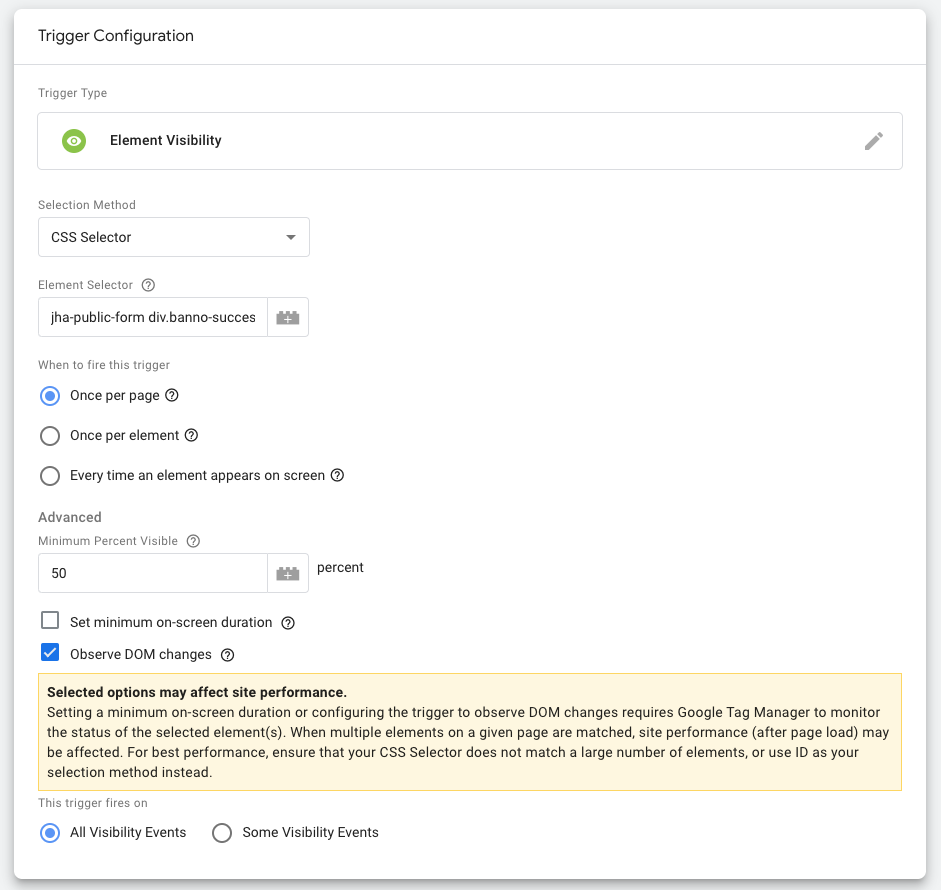
For the Element Visibility trigger to work, we must listen for the “Thank you” message to become the first child of the <jha-public-form> element on the page.
The CSS selector jha-public-form div.banno-success-message:is(:first-child) will be valid only when the form is submitted, and it will work for our trigger.
Below is a screenshot of the configuration options to use for the Element Visibility trigger.