BSL Support Guide
Features that use BSL
- Dormancy Prevention
- Business BillPay
- Enrollment
- Account Recovery
- Password Management
- Consumer Status Check
- Username Management
- Transfer Entitlements (for Iberia or other FI’s with certain NT custom)
- Account Entitlements
- Stop Payments
- Change Account Name
- Change Username
- NT SSO (This is the only item for which we’re using the BSL for CU’s (as of 7/10/18)
- Change Contact Info
Documentation
Diagram
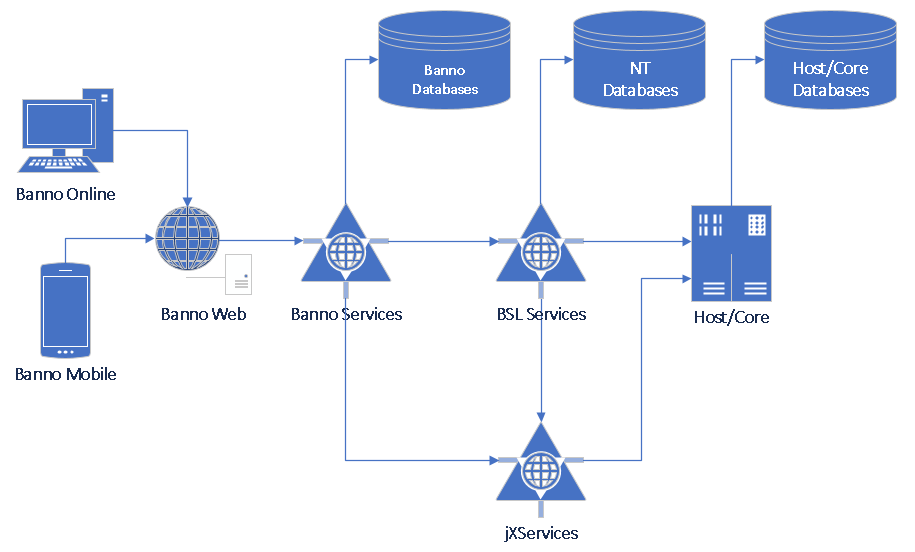
- Author: David Whitbeck, BSL Architect
Implemented BSL Operations
AddStopPayment
Called with: NTID
Used for: Stop payments
AdminPasswordReset
Called with: NTID
Features: Enrollment, Account recovery
Authenticate
Called with: NTID
Features: Dormancy prevention
GetAccount
Called with: NTID
Used for: Enrollment, Account recovery, Transfer entitlements, Account entitlements, Business Billpay, Stop payments
GenerateAuthenticationToken
Called with: NTID
Used for: NT SSO
GetAliasRules
Called with: Bank number
Used for: Enrollment, Change username
GetPasswordRules
Called with: Bank number
Used for: Enrollment, Account recovery, Change username, Change password
GetStopPayments
Called with: NTID
Used for: Stop payments
Save
Called with: NTID
Used for: Change contact info
SaveAccount
Called with: NTID
Used for: Change account name
SaveAlias
Called with: NTID
Used for: Change username
SaveCredentials
Called with: NTID
Used for: Enrollment
SavePassword
Called with: NTID
Used for: Change password
ValidateAlias
Called with: NTID or Bank number
Used for: Enrollment, Change username
ValidateAuthToken
Called with: NTID
Used for: NT SSO
ValidatePassword
Called with: NTID or Bank number
Used for: Enrollment, Account recovery, Change password
Production Support Tips
Kibana
Kibana searches can be constructed using this general template:app_name:netteller-bsl-service AND [Operation] AND [NTID/Bank Number]
Escalation
When troubleshooting a production issues with a particular BSL request, our current process is to email David Whitbeck (dwhitbeck@jackhenry.com), James Folkerts (jafolkerts@jackhenry.com) and Phi Nguyen (PNguyen@jackhenry.com). cc bannosupport@jackhenry.com on all communications. The BSL team will always want to know the time and the activity ID of the request. The activity ID is in every request, e.g.:
{
  "ActivityTracking" : {
    "ActivityId" : "be34a620-847d-11e8-9b75-005056ada769"
  },
  "EndUser" : {
    "InternalId" : "789500000695",
    "InternalSecondaryId" : null,
    "UserType" : "XXXX"
  },
  "ApplicationNameType" : "XXXX",
  "InstitutionId" : "XXXX",
  "__type" : "XXXX",
  "AuthenticationUser" : {
    "InternalId" : "789500000695",
    "InternalSecondaryId" : null,
    "UserType" : "XXXX"
  }
}
Test Environments
netteller-bsl-configs is a web service that contains configuration data. It serves netteller-bsl-service by exposing the Bank Numbers and Base URL.
Note that the Base URL is used in order to determine which BSL Web Server to access.
-- Querying in postgres-jabberwocky in uat-2 shows:
   netteller_bsl_configs=> select distinct base_url from bsl_configs ;
                  base_url
   --------------------------------------
    https://ntbsl.netteller.com:442        -- Production Environment
    https://ntbsl-e.qa.netteller.com:442   -- Pre-Prod/UAT Environment
    https://ntbsl-a.qa.netteller.com:442
    https://ntbsl-d.qa.netteller.com:442
(4 rows)
- 2018 Silverlake Test - E
- 2019 Silverlake Test - D
- 2020 Silverlake Test - D
- Silverlake Business - D
- 2018 CIF 2020 Test - E
- 2020 CIF 2020 Test - D (Doesn’t exist in Banno yet)
- Core Director Test - A
Note that, per Rachel Fredericksen, the “2018 *” FIs will be retired.