Triage Playbook
When channels are very busy it’s easy for channel owners to unintentionally miss requests and questions. Slack adopted a method to triage incoming tasks to help increase visibility. With a couple minor tweaks to Slack’s playbook we have co-opted their approach across our slack workspace.
Channel Members
A few things we’re asking you to do.
Indicate priority with emoji.

:urgent:means the issue is URGENT.
:help:means a question or request. ️
️ :fyi:means for your information or feedback.Include a brief description of your request after the emoji.
Respond in thread to keep the channel clean.
Examples
I need help deploying a widget this afternoon, is anyone available to help?
I can’t access banno.com/a/blah and I have a demo in a few minutes. HALP!
️ I noticed a weird LinkedIn post about credit unions.
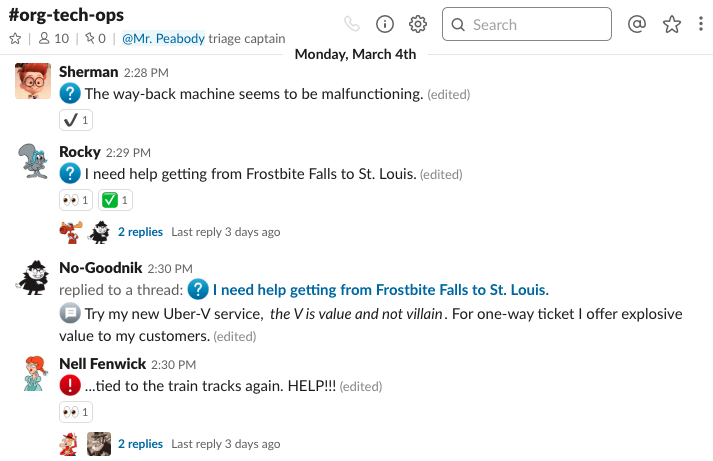
Channel Owners
Assign and claim tasks with reactions that tell others what’s being worked on and by whom.
👀
:eyes:means I’m looking at this for you.
:ack:means Acknowledged, we’ve seen your message, but can’t look at it yet.
🔄:wip:aka:arrows-counterclockwise:means I’ve started working on the issue, but it could take a while.
✅:done:aka:white_checkmark:means I’ve fixed the issue.Follow up in threads to keep the channel clean. Use the Also send to #channel sparingly.
You may have noticed most of these emoji already have “official” emoji names, however we think also having a contextualized alias is swell.