See also the onboarding schedule for new hires.
Tech Stack
- Node.js
- Javascript or Typescript
- Express
- Jasmine and c8
- ESLint and Prettier
- Postgres
- Redis
- Docker
- Vault
- Prometheus
Software Tools
In general, Banno tries to not prescribe specific tools or software except when necessary. For example, you can use whatever IDE or code editor you feel comfortable with.
You may need to elevate to admin privileges to install software, or request an exception for an unknown app to run, but these are straightforward processes that #org-ground-control can help with.
You should install and familiarize yourself with our tools:
Node.js and npm, of course.
You must also configure npm to use our internal registry for @banno packages.
Because of the way that OSX and other tools like Homebrew and XCode modify the system, we recommend using a Node version manager like nvm or n to install Node+npm. For example:
nvm install stable
nvm alias default stable
nvm use default
Most repos use pnpm for package management.
git and GitHub are used for version control.
Make sure your IDE recognizes EditorConfig files – a plugin may need to be installed.
A Docker-compatible container manager is used to containerize our services.
- Rancher Desktop is the recommended app.
- See the wiki guide for installation instructions.
- To get Rancher working with Binci, change the environment variable whhere Binci mounts
/tmpby settingexport BINCI_TMP=/tmp/rancher-desktopin .zshrc.- Rancher mounts
/tmpat/tmp/rancher-desktopinstead of/tmp. If you get an error while trying to start Binci and have already set your env, make sure that/tmp/rancher-desktopexists and is writeable by runningmkdir /tmp/rancher-desktop.
- Rancher mounts
- Warning: We have seen significant performance disparity with Rancher Desktop.
- You can also use Docker Desktop.
- It must be licensed. Create a ticket using this form. Make sure to select “Docker Access” for Type of Request.
- Contact Jonathan Ball (JonBall@jackhenry.com) if you are having problems obtaining your license.
- Follow the configuration instructions here.
- Make sure enough resources are allocated to it (at least 8GB memory).
- You must authenticate your machine to manually push images to our internal registry.
- Rancher Desktop is the recommended app.
Binci for running services and containers during development.
postgres-connect Helper for command line SQL. E.g.
postgres-connect connect --role nodejs --name postgres-nodejs --env production -d node-consumer-login-proxyArgoCD for continuous delivery. Submit a ticket for ArgoCD access.
Launch Darkly Feature Flags. Use the canvas pinned in
#org-launch-darklyto request access, then consult with your manager after approval.
Other tools that are useful:
- Homebrew is a package manager for OSX.
- Postman for sending and testing API requests. For integration with your Chrome cookies, you should also install the Postman Interceptor extension.
- Charles is an OSX app for watching and examining HTTP(S) traffic.
- kubectl Kubernetes command line tool
- Setup and Testing Here are instructions to set up kubectl and how to start testing internal k8 endpoints.
- Vault See also “Using vault CLI Tool” at the bottom.
- Mermaid is used for diagrams and design.
- We prefer to create diagrams in Mermaid but in the scenario that Mermaid doesn’t cover your use case, you can use Figma.
Observability
- DataDog Enterprise logging. Individual log entries exposed through query interface. You must log in through Okta.
- Grafana Graphing, trends, alerting.
- Honeycomb Querying of logging spans and drill down. Service Level Objectives and alerting.
- Kubernetes Orchestration dashboards.
Meetings
- The Prism and Terminus teams have check-ins every Monday and Thursday at 11:00 AM Central, where each member gives an update on their currently assigned issues and what they will be working on during that week. Updates are also left as comments on Jira issues.
- The Prism and Terminus teams have a monthly retrospective.
- The Prism and Terminus teams have informal knowledge dumps every couple of weeks.
- Each member of the team has a weekly one-on-one with the manager.
- JH Digital has a quarterly meetup for customers (“Digital Banking Meetup” on the JH Events page) where it can be useful to see the roadmaps and overall strategy.
Contractor Specific Help
There are a few other things to consider if you are a contractor and not a Jack Henry employee. Check out this document here.
GitHub
PR and Branch expectations
- PRs should follow the GitHub issue template auto-populated in the repo. They should mention what they are for and why the changes are being proposed.
Jira
Slack
We use Slack for day-to-day communication and triage. Please read the Coummincation Guide to learn the proper etiquette in Slack channels. Check out the following Slack channels:
Team Prism
#auto-prismcontains notifications from Prism apps#org-prismis for communicating Prism related announcements towards other teams + management#auto-prism-pris where PRs are automatically posted by the Github bot#team-prism-pris where team members post their PRs for others to review#team-prism-privateis for communicating with the rest of the team
Team Terminus
#auto-terminuscontains notifications from Terminus apps#org-terminus-nagis for communicating Terminus related announcements towards other teams + management#org-terminus-nag-pris for communicating Terminus related announcements towards other teams + management#org-terminus-nodejs-libsis for communicating Terminus node-js items#team-terminus-ffis where automation posts fire fighting alerts#team-terminus-pris where team members post their PRs for others to review#team-terminus-privateis for communicating with the rest of the Terminus team
Other semi-related channels:
#auto-authy-codesfor Authy codes#org-apollofor help with identity accounts and access#org-atom#org-bbot-sql-scripts#org-custom#org-deploymentsfor following service deploys#org-developer-relations#org-discovery#org-dobby#org-dracarys#org-engineeringis for the engineering teams#org-faqfor posing questions to the Digital group#org-firefighter-requests#org-ground-controlfor help setting up your machine or accounts, and getting access to things.#org-kobalt#org-launch-darkly#org-matterhorn#org-melt#org-nebula#org-new-hiresis where new hires hang out and can ask questions#org-observability#org-online#org-pulsar#org-reliability-fffor firefighting / incidents#org-security#org-staging-ff#prod-platform-uxfor following platform-server deploys#proj-api-docsfor updates regarding API documentation#team-digital
Certificates
You will need to make sure your system trusts the Banno CA certificate(s). Open Keychain Access on your machine and search for banno in either the login or System keychain. Look for certificates starting with Banno CA.
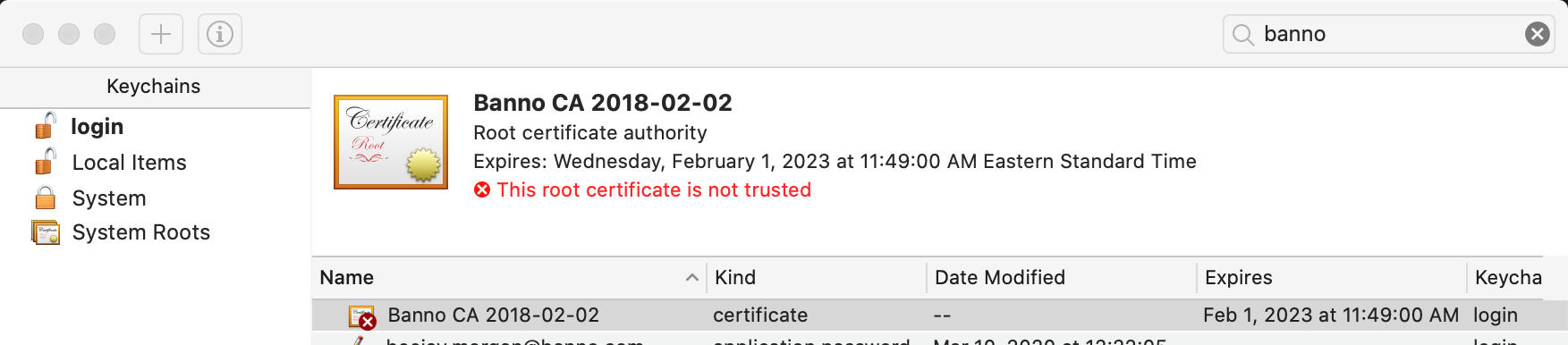
* If you do not have any Banno certificates in your keychain, download this certificate, and double-click it to install.
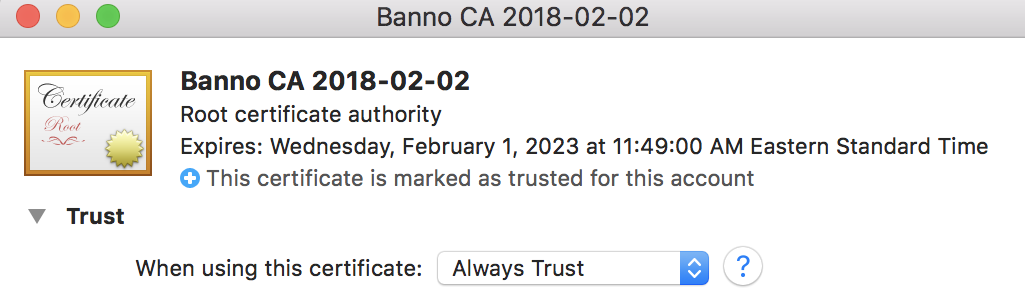
Once you have the Banno certificate in your keychain, double-click each one in Keychain Access and select Always Trust from the first dropdown.
Incident.io
Anyone who will be on firefighting rotation should set up an incident.io account and add themselves to the schedule. See the Account Setup docs.