Procedures & Best Practices
Before proceeding to the content below, please read our JHA corporate customer service policy found on JHA today > Service Standards > click Policies > locate Corporate Customer Service Policy among the list.
You should also review the Customer Service Associates Guide.
How Cases are Assigned
- Cases should be divided equally among the associates currently in rotation and taking cases. The current case schedule is subject to change/modification as new associates join the team and/or as appropriate should the flow & coverage need to be changed.
- For specifics on how cases are assigned see pinned messages in shift channel
#am-shift-chat-7am-12pmand#pm-shift-chat-12pm-7pm.
- For specifics on how cases are assigned see pinned messages in shift channel
- Be on the lookout for common case trends, especially after deployments. You could be identifying a critical incident. When in doubt, ask the team
#team-banno retail-supportto validate. - Some days we see a higher case flow than normal. Raise the flag by communicating in the
#team-banno retail-supportchannel if you need assistance with case call back requests or taking cases.- Note: We would rather a case sit a little longer waiting to be picked up so long as we’re delivering the best support possible on the cases we are taking.
Standard Case Handling
Once the case has been assigned the following processes help keep you on the right track. From case status to how we add notes and close cases, we should have all bases covered.
If you ever feel like you don’t know how to complete a step, raise the flag to a teammate. We may need to update documentation to account for any information that would be helpful to do your job.
Initial case contact
The expectation and requirement within Banno Support is to call your customer if this is their preferred contact method. This is expected and within Jack Henry’s case management procedures.
- Phone calls prevent escalations.
- Phone calls avoid confusion.
- Phone calls build relationships.
If the preferred contact method is a phone call and your first case note is not a phone call, your second case note must be a phone call.
- Phone: You see the case contact’s phone number if they prefer a call.
- Email: You see the case contact’s email address if they prefer you communicate in a written format. Please email through the case notes so that all interaction is consolidated and accessible by anyone.
- Note: Rarely will there be times when direct email should/can/makes sense to use. This is an exception but if it happens, make sure that any external communication is copied to the case notes.
Phone conversations at any point in the life of the case should be clearly documented in the case during or after the discussion has taken place. This helps jog memory of last discussions and for any others that may be assisting in your absence or need information on a particular case. Utilizing clear note summaries is a great practice. Some examples include:
- Contact attempted, left voicemail (VM)
- Email to Jane Doe
- Response/request for clarification
- Update/research
- Research/recommendation
- Banno support - recap of discussion
- Resolution/recap
Initial case contact must be moved from a New status to Research or Left Message status.
- Your initial contact is to verify and collect the appropriate details to research (see Scope the Case, below).
- Best case scenario is you solve the case at first contact, however you may need to conduct more research or engage with engineers or collect more information from the end user/FI. In these scenarios, step two is to put the case in the following status
- Awaiting User - Need more info from the FI or end user.
- Awaiting Vendor - Jira ticket has been opened (remember to update to a technical case type).
- Research - Initial investigation status only. SLS clock continues to run, do not leave a case in this status for more than one business day.
- Using follow up dates within jSource help organize your workload for the following days. These dates vary from case to case but some best practices would be:
- Awaiting user - set for 1-2 days out
- Awaiting vendor - set for 2-3 days out
Need a place to start working cases? Consider this order of priority.
Need a place to start working cases? Consider this order of priority (hint: these are in your PAS evaluations):
- Urgent not contacted New status
- High/Medium not contacted New status
- Fraud/potential financial loss through money movement (Zelle, Billpay, Ext. Xfers, ACH)
- Needs Call Back status
- FIs actively engaged in case notes
- Time sensitive (risk of aging logs)
- General backlog
Scope the case
Do you have all the information to get to researching? If not, can you begin research with what you have while you ask for additional content from the FI?
- Do you understand the problem being communicated to you? Do you understand the steps to recreate?
- Do you have a NTID/username/full name
- Do you need account numbers?
- Are there any screenshots or attachments with greater detail?
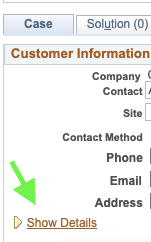
- Within the jSource case under the Case tab, have you checked Show Details (see image below)?
- When did this issue/problem begin? And is it still occurring?
- Is it impacting one or multiple users?
- Is there any additional information you need about at least the example user?
Couldn’t reach the case contact and you don’t have all the information? Typically you’ll still be able to begin initial research.
- Assuming this is a non-urgent case, think about what you can investigate.No user provided? Utilize the case contact as your end user. They’re probably a customer and may have replicated the reported issue.
- Is this happening globally? Again, use the case contact. They’ve probably replicated.
When cases seem to morph or notes are getting particularly difficult to follow, it’s good practice to take a second to recap the case and centralize information into a single case note. This can be internal or customer facing but can be very useful for anyone jumping in to help while on PTO or for leadership/senior TSR review.
When initial contact isn’t using their primary/preferred contact method, consider the following:
- Emailing the note via jSource is a good practice. This prevents the FI from having to log back into the portal to review your initial case note expressing ‘you’ll be researching,’ or ‘I’ll look into this and get back with you.’
- Make sure you utilize their preferred contact method at the next contact attempt.
- Hi there, I wanted to follow up with you from my note earlier today.
- Did the content I provided help?
- Were there additional questions around what I provided?
- Is there anything I can help you with?
- Hi there, I wanted to follow up with you from my note earlier today.
Parent/Child case procedures
- Incidents - WIP Full Parent/Child case procedure
- When incoming cases are associated with an incident, complete the following procedures to accurately relate the case:
- Update the problem summary to include “CC” at the beginning of the field (ex: CC - Banno Down). This helps identify incident cases quickly in your own queue.
- Change the case sub-type to “Technical” (optional) Change the case status to “Research” (required - This allows the case to be closed when the Parent Case closes). Click the ‘Related Cases’ tab of the parent case or child case Choose ‘Relate an Existing Case’ Enter the case ID for the parent case (PC) in the search and click on the case that returns in the search Change the relationship type to Global and the parent case (PC) should be listed as the parent and the case you’re relating to the parent should be listed as the child respectively. If any Parent to Child notes have been previously communicated on the Parent Case, please communicate those appropriately to the institution. Maintain the case in your queue until Parent Case closure.
- When incoming cases are associated with an incident, complete the following procedures to accurately relate the case:
- Non-Incidents - not currently used today
- Relate cases that are previously mentioned by the institution to allow quick access.
- Choose ‘Related Case’ from the tab options within a jSource case.
- Choose ‘Relate an existing case’
- Search by case number
- Determine the relationship between the cases, typically ‘Common’ or ‘Equivalent’ and complete the remaining fields in the process.
- Relate cases that are previously mentioned by the institution to allow quick access.
Research Cases
Available self-service resources include the folling:
- Feature Matrix - unsure who implements and supports the feature?
- Ops docs - the nuts and bolts of features within online banking
- DataDog Logs - wiki - learn how to utilize Banno logging
- Knowledge.banno.com - FI facing documentation
- docs.banno.com/knowledge (lots of internal documentation here)
- For Clients Portal (don’t forget the Archive sections)
- Common Responses (use as a guide to customize them in your own voice)
- Design Specs - Found in docs.google.com OR on the For Clients Portal > documentation > Archived documents > Feature Presentations.
- Search and ask questions in #team-banno retail-support
- Allow for up to an eight hour response time but resurface as needed.
- Search and ask questions in Stack Overflow (full process and more details)
- Stack Overflow
- Search old question/content in
#org-prod-mgmt
Close Cases
Assuming you are unable to make contact with the client, the case should remain open, at a minimum, up to the restore time service level standard. Before the case can be closed, the following must have occurred:
- The client’s preferred contact method was attempted multiple times (2+).
- All alternative contact methods were attempted (phone, case note, emailed case note).
- All contact attempts have been recorded using case notes.
Once the above has been satisfied, ensure your final note accurately recaps the case and issues presented along with a resolution and use this same note into your case resolution.
If you were unable to reach your case contact, the expectation is that you conduct adequate research, share documentation, and demonstrate effort with the available information you have. You’ll still want to contact the FI three times over the course of 2-3 days before closing the case. Be sure to note the case of your contact attempts.
Reopen case procedures
- Make initial contact with the case using the primary contact method.
- Clarify the reason for the FI reopening, and determine how you can assist.
- If the issue is determined urgent, continue working the case, leveraging any available resources and working the case until closure or until the issue is unresolved but no longer urgent.
- If the issue is not determined urgent and the existing TSR is out of the office/unavailable for one business day or less, assist the customer until EOD. Let the FI know that you’ll assist until the original TSR returns to the office.
- If the issue is not determined urgent and the existing TSR is out of the office for two business days or more, assume the responsibility of the case, continue working with the FI until closure, leveraging the original TSR upon return.
Handle Fraud Cases (WIP)
- Copy/Paste the user’s URL to the case.
- This is a best practice to communicate to the institution before they take action to maintenance the profile within core. The Banno People URL will be suppressed after the FI takes action but the profile and history remain in People. If the NTID or username has been shared but this step was missed, you can search by username or NTID in fetch.
- NOTE: The username field is case sensitive. This search may pull multiple userIDs so verify and identify the user in People, then share the URL with the FI.
- Confirm that all devices have been removed from the profile.
- Password changes do not force re-authentication of recognized devices. This allows the fraudster to retain access to the profile.
- Document the following: Has the institution confirmed the authenticity of the external transfer accounts with their end user?
- Recommend the FI identify important details from the user’s activity. If needed, assist with gathering the following:
- Document dates and times for identified money movement activities that the institution surfaces as fraud.
- Document the device information for the fraud activity in the case.
- Document when that fraudster device was first seen and note that in the case.
- Based on the user activity, document how the device was first authenticated, note your finding in the case.
- Was it account recovery?
- Was the actual customer logging in during the fraudster’s login attempts?
- Can you confirm if the 2fa code was shared? NOTE: base ‘actual customer’ on prior devices from the activity before the identified fraudster’s device is first seen.
- Document in user messages if the username, password, phone number, email address, physical address (CUs) were sent. Confirm those entries also appear in the user activity.
Transfer procedures (WIP)
Remember, we have the feature implementation matrix resource to determine enablement and support responsibilities for PowerOns, SSOs, external links, and feature functionality.
- Transferring a case should be completed during support business hours (M-F, 7am-7pm CT) only, unless you’re the support firefighter.
- Be sure to utilize a case note template (if available), share a concise description of the case thus far, include a reason for transferring the case, and communicate to the FI that the case will be moving.
- When possible, share logs, links, configuration, screenshots, documentation, etc. and keep the note visible to the FI whenever possible.
- Remember to be available for questions via Slack or MS Teams from the department receiving your case.
- Direct after-hours transfers through the JH Corporate Call Center only when in urgent status. All other cases should be held until next business day.
Tier-2 Case Triage Procedures
Tier-2 Triage
Before opening a Jira ticket consider the following:
- Have I looked for documentation?
- Have I searched Slack conversations?
- Is there already an identical Jira ticket open?
- Have I asked my team?
If so, proceed with opening a Jira ticket using Customer Issue Management documentation. Consider the following as well:
- When an issue has been created through Jira Service Desk, it should be acknowledged by Tier-2 within 2 business days of creation. Tier-2 sweeps new cases daily.
- If you do not receive a response on your ticket in the first 2 business days of creation, please ping in the
#org-banno-tier2-triageSlack channel to notify the team. - High priority issue? Tag @tier2support in the #org-banno-tier2-triage channel.
- Need to Escalate? Tag @support-banno-mgrs-sups
Upon Tier-2 determination that the Jira ticket needs engineering engagement, Tier-2 rep assigns the Jira and jSource case to themselves and continues relaying updates to the financial institution.
If Tier-2 determines no engineering assistance is needed, the Tier-1 rep maintains Jira and jSource case ownership and the two teams continue collaborating until the Jira ticket’s status is Closed.
Tier-2 transfer note template
Upon determining Engineers and Tier-2 research/triage will continue, Tier-2 TSRs pull the jSource case into their queue and add the following note:
Summary: Transferring case to Tier-2 Technical Support
Description: As we previously mentioned in our case notes, [TIER 1 REP NAME] would be engaging engineers for assistance on resolving your case. At this time, your support case will be moving to our Tier-2 technical support team while research and triage continues with engineers. [TIER 1 REP NAME] will remain as an interested party on your case for visibility, but I’ll be sharing further updates as we work toward a resolution on this case. Should you have any questions, I’m happy to assist, please update the case notes accordingly.
Script Approval Process
There’s a variety of cases that require creating a script. First, update your case letting the case contact know this requires a script for completing the request and that these typically are completed the same business day but can take up to 24 hours for completion.
- If you’re not comfortable writing scripts from scratch, team Kobalt created a self-service tool. Please ask questions to verify/validate you’re using the correct script.
- If you do have experience with script creation, [start here]https://github.com/Banno/banno-data-one-off-scripts/new/master/implementation. Tip: Need a special action? Apply Labels to the pull request such as Do Not Run, Do Not Merge, etc.
- Once created, you copy your Github PR to #team-ops-prs for peer review and approvals. A script commonly takes two approvals (:white_check_mark emoji).
- Remember to include the Github link as an internal note to your case.
- Approvals should contain one senior TSR/Supervisor/Manager/Tier2 review from the Support team.
- It’s everyone’s responsibility to review/approve scripts. If you’re not comfortable with the script, ask questions and do not approve without understanding what this script will do.
- Avoid using Slack DMs for requesting approvals unless the original Github PR has already been published to the #team-ops-prs channel. This ensures maximum visibility if we need to track down details of the script.
- NEW: Are you the second approver? @/tag the teammate who posted the script. Tip: Remember you can set Slack reminders (20 min, 1 hr, 3 hrs, next week)
- Once approvals are obtained, the script poster/author will utilize the (:wolfbot emoji) to automate the run process.
- REMEMBER to merge your PR after it runs successfully.